# Enumeration
## **WP Version - Source Code**
```html
...SNIP...
...SNIP...
```
```shell-session
eldeim@htb[/htb]$ curl -s -X GET http://blog.inlanefreight.com | grep '
```
In older WordPress versions, another source for uncovering version information is the `readme.html` file in WordPress's root directory.
## Plugins and Themes Enumeration
### **Plugins**
```shell-session
eldeim@htb[/htb]$ curl -s -X GET http://blog.inlanefreight.com | sed 's/href=/\n/g' | sed 's/src=/\n/g' | grep 'wp-content/plugins/*' | cut -d"'" -f2
http://blog.inlanefreight.com/wp-content/plugins/wp-google-places-review-slider/public/css/wprev-public_combine.css?ver=6.1
http://blog.inlanefreight.com/wp-content/plugins/mail-masta/lib/subscriber.js?ver=5.3.3
http://blog.inlanefreight.com/wp-content/plugins/mail-masta/lib/jquery.validationEngine-en.js?ver=5.3.3
http://blog.inlanefreight.com/wp-content/plugins/mail-masta/lib/jquery.validationEngine.js?ver=5.3.3
http://blog.inlanefreight.com/wp-content/plugins/wp-google-places-review-slider/public/js/wprev-public-com-min.js?ver=6.1
http://blog.inlanefreight.com/wp-content/plugins/mail-masta/lib/css/mm_frontend.css?ver=5.3.3
```
### Themes
```shell-session
eldeim@htb[/htb]$ curl -s -X GET http://blog.inlanefreight.com | sed 's/href=/\n/g' | sed 's/src=/\n/g' | grep 'themes' | cut -d"'" -f2
http://blog.inlanefreight.com/wp-content/themes/ben_theme/css/bootstrap.css?ver=5.3.3
http://blog.inlanefreight.com/wp-content/themes/ben_theme/style.css?ver=5.3.3
http://blog.inlanefreight.com/wp-content/themes/ben_theme/css/colors/default.css?ver=5.3.3
http://blog.inlanefreight.com/wp-content/themes/ben_theme/css/jquery.smartmenus.bootstrap.css?ver=5.3.3
http://blog.inlanefreight.com/wp-content/themes/ben_theme/css/owl.carousel.css?ver=5.3.3
http://blog.inlanefreight.com/wp-content/themes/ben_theme/css/owl.transitions.css?ver=5.3.3
```
To speed up enumeration, we could also write a simple bash script or use a tool such as `wfuzz` or `WPScan`, which automate the process.
## Directory Indexing
### Common Rutes
* /wp-content/plugins/{name\_plugin}
* /wp-content/themes/{name\_theme}
* /wp-content/uploads
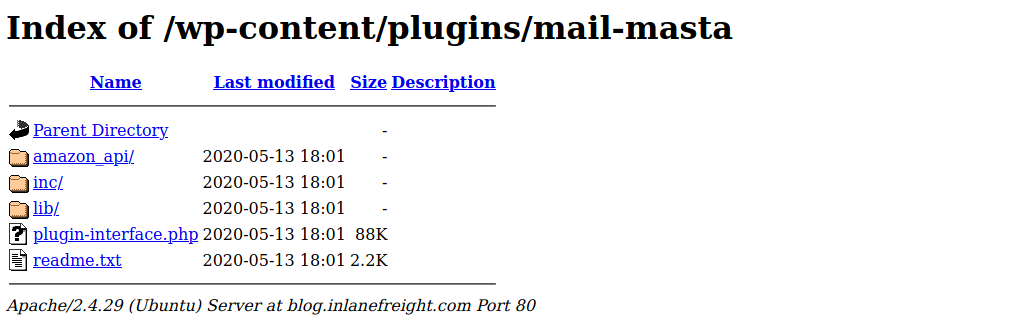
The following example shows a disabled plugin.

If we browse to the plugins directory, we can see that we still have access to the `Mail Masta` plugin.
We can also view the directory listing using cURL and convert the HTML output to a nice readable format using `html2text`.
Directory Indexing
```shell-session
eldeim@htb[/htb]$ curl -s -X GET http://blog.inlanefreight.com/wp-content/plugins/mail-masta/ | html2text
****** Index of /wp-content/plugins/mail-masta ******
[[ICO]] Name Last_modified Size Description
===========================================================================
[[PARENTDIR]] Parent_Directory -
[[DIR]] amazon_api/ 2020-05-13 18:01 -
[[DIR]] inc/ 2020-05-13 18:01 -
[[DIR]] lib/ 2020-05-13 18:01 -
[[ ]] plugin-interface.php 2020-05-13 18:01 88K
[[TXT]] readme.txt 2020-05-13 18:01 2.2K
===========================================================================
Apache/2.4.29 (Ubuntu) Server at blog.inlanefreight.com Port 80
```
## User Enumeration
### First Method
The `admin` user is usually assigned the user ID `1`. We can confirm this by specifying the user ID for the `author` parameter in the URL.
```
http://blog.inlanefreight.com/?author=1
```
This can also be done with `cURL` from the command line. The HTTP response in the below output shows the author that corresponds to the user ID. The URL in the `Location` header confirms that this user ID belongs to the `admin` user.
#### **Existing User**
```shell-session
eldeim@htb[/htb]$ curl -s -I http://blog.inlanefreight.com/?author=1
HTTP/1.1 301 Moved Permanently
Date: Wed, 13 May 2020 20:47:08 GMT
Server: Apache/2.4.29 (Ubuntu)
X-Redirect-By: WordPress
Location: http://blog.inlanefreight.com/index.php/author/admin/
Content-Length: 0
Content-Type: text/html; charset=UTF-8
```
The above `cURL` request then redirects us to the user's profile page or the main login page. If the user does not exist, we receive a `404 Not Found error`.
#### **Non-Existing User**
```shell-session
eldeim@htb[/htb]$ curl -s -I http://blog.inlanefreight.com/?author=100
HTTP/1.1 404 Not Found
Date: Wed, 13 May 2020 20:47:14 GMT
Server: Apache/2.4.29 (Ubuntu)
Expires: Wed, 11 Jan 1984 05:00:00 GMT
Cache-Control: no-cache, must-revalidate, max-age=0
Link: ; rel="https://api.w.org/"
Transfer-Encoding: chunked
Content-Type: text/html; charset=UTF-8
```
### Second Method
#### **JSON Endpoint**
```shell-session
eldeim@htb[/htb]$ curl http://blog.inlanefreight.com/wp-json/wp/v2/users | jq
[
{
"id": 1,
"name": "admin",
"url": "",
"description": "",
"link": "http://blog.inlanefreight.com/index.php/author/admin/",
},
{
"id": 2,
"name": "ch4p",
"url": "",
"description": "",
"link": "http://blog.inlanefreight.com/index.php/author/ch4p/",
},
```
## Login
### **cURL - POST Request**
```shell-session
eldeim@htb[/htb]$ curl -X POST -d "wp.getUsersBlogsadminCORRECT-PASSWORD" http://blog.inlanefreight.com/xmlrpc.php
isAdmin1urlhttp://blog.inlanefreight.com/blogid1blogNameInlanefreightxmlrpchttp://blog.inlanefreight.com/xmlrpc.php
```
If the credentials are not valid, we will receive a `403 faultCode` error.
#### **Invalid Credentials - 403 Forbidden**
```shell-session
eldeim@htb[/htb]$ curl -X POST -d "wp.getUsersBlogsadminasdasd" http://blog.inlanefreight.com/xmlrpc.php
faultCode403faultStringIncorrect username or password.
```
These last few sections introduced several methods for performing manual enumeration against a WordPress instance
## WPScan
The `--enumerate` flag is used to enumerate various components of the WordPress application such as plugins, themes, and users. By default, WPScan enumerates vulnerable plugins, themes, users, media, and backups
> Note: The default number of threads used is 5, however, this value can be changed using the "-t" flag.
```shell-session
eldeim@htb[/htb]$ wpscan --url http://blog.inlanefreight.com --enumerate --api-token Kffr4fdJzy9qVcTk
[+] URL: http://blog.inlanefreight.com/
...SNIP...
```
---
# Agent Instructions: Querying This Documentation
If you need additional information that is not directly available in this page, you can query the documentation dynamically by asking a question.
Perform an HTTP GET request on the current page URL with the `ask` query parameter:
```
GET https://eldeim.gitbook.io/brain_fuck/notes/certifications/eastereggs/htb-cbbh/hacking-wordpress/enumeration.md?ask=
```
The question should be specific, self-contained, and written in natural language.
The response will contain a direct answer to the question and relevant excerpts and sources from the documentation.
Use this mechanism when the answer is not explicitly present in the current page, you need clarification or additional context, or you want to retrieve related documentation sections.